



Muestra quién hizo qué y cuándo, lo más reciente primero y agrupado por días, con un icono o iniciales para cada autor.
Por qué ayuda
- Agrupado por días
- Iconos de autores
- Historial claro
Dónde encaja
- Registros de auditoría
- Proyectos
- Cuentas
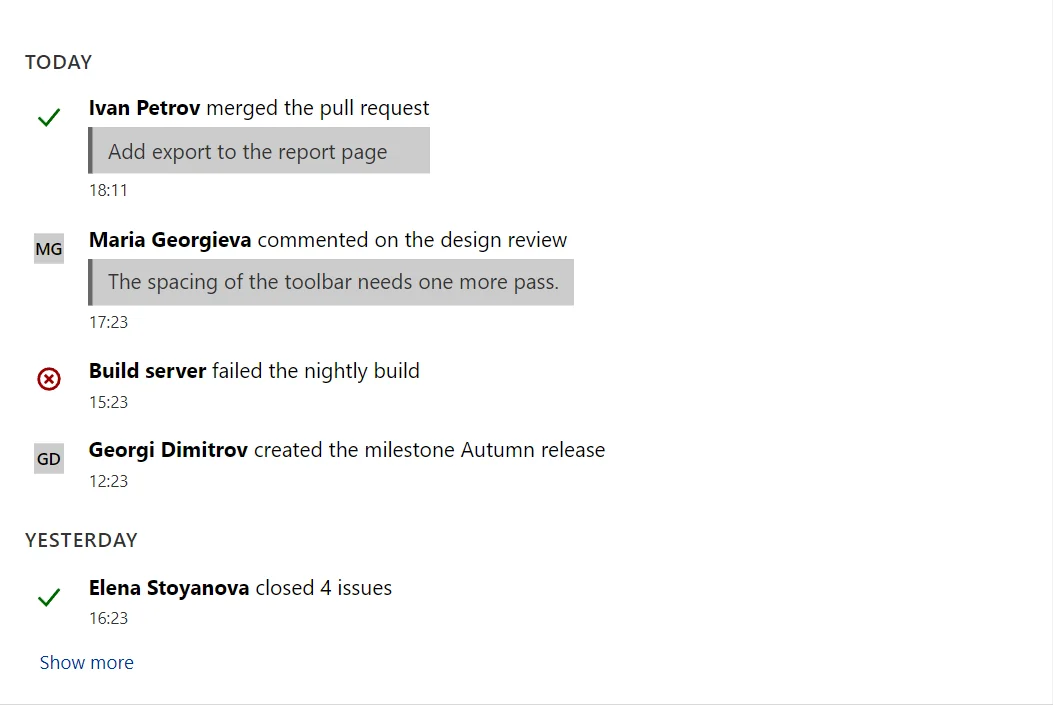
Ejemplo
<ActivityFeed Label="Project activity" Items="_items" PageSize="5" />

@code {
    private readonly ActivityItem[] _items =
    [
        new("Ivan Petrov", "merged the pull request", DateTime.Now.AddMinutes(-12), "Add export to the report page", IconName.Check, Severity.Success),
        new("Maria Georgieva", "commented on the design review", DateTime.Now.AddHours(-1), "The spacing of the toolbar needs one more pass."),
        new("Build server", "failed the nightly build", DateTime.Now.AddHours(-3), null, IconName.ErrorCircle, Severity.Error),
        new("Georgi Dimitrov", "created the milestone Autumn release", DateTime.Now.AddHours(-6)),
        new("Elena Stoyanova", "closed 4 issues", DateTime.Now.AddDays(-1).AddHours(-2), null, IconName.Check, Severity.Success),
        new("Nikolay Kolev", "assigned you to the invoice task", DateTime.Now.AddDays(-1).AddHours(-5)),
        new("Desislava Ivanova", "uploaded 3 files", DateTime.Now.AddDays(-2), null, IconName.Upload),
        new("Stefan Angelov", "changed the due date of the audit", DateTime.Now.AddDays(-3)),
        new("Plamen Hristov", "joined the project", DateTime.Now.AddDays(-4))
    ];
}
Un breve fragmento. Añade @using RayCraft.Blazor.Components a tu página y usa un modo de renderizado interactivo.
Incluido en RayCraft Free. Hay ejemplos que funcionan en el repositorio de GitHub (MIT); contiene código de ejemplo y demostración, no el código de la biblioteca.