



Related actions look better together. ButtonGroup joins buttons into one segmented control, horizontally or vertically, so choices such as a view switcher read as a single thing.
Why it helps
- One tidy control instead of loose buttons
- Horizontal or vertical
- Pairs naturally with toggle buttons
Where it fits
- View switchers (list, grid, board)
- Date range shortcuts
- Alignment and format choices
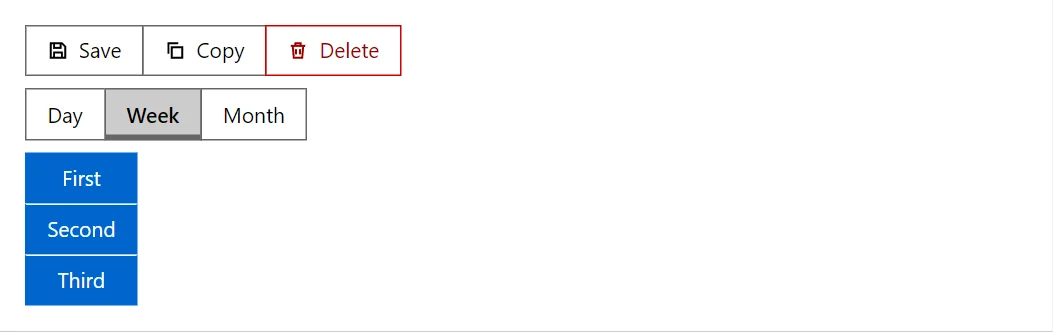
Example
<Stack Direction="StackDirection.Column" Align="flex-start">
    <ButtonGroup Label="Actions">
        <Button Variant="Variant.Outlined" StartIcon="IconName.Save">Save</Button>
        <Button Variant="Variant.Outlined" StartIcon="IconName.Copy">Copy</Button>
        <Button Variant="Variant.Outlined" StartIcon="IconName.Delete" Color="ButtonColor.Danger">Delete</Button>
    </ButtonGroup>
    <ButtonGroup Label="View">
        @foreach (var view in _views)
        {
            <ToggleButton Pressed="_view == view" PressedChanged="@(_ => _view = view)">@view</ToggleButton>
        }
    </ButtonGroup>
    <ButtonGroup Vertical="true" Label="Filled">
        <Button>First</Button>
        <Button>Second</Button>
        <Button>Third</Button>
    </ButtonGroup>
</Stack>

@code {
    private readonly string[] _views = ["Day", "Week", "Month"];
    private string _view = "Week";
}
A short fragment. Add @using RayCraft.Blazor.Components to your page and use an interactive render mode.
Included in RayCraft Free. Working examples are in the GitHub repository (MIT); it holds example and demo code, not the library code.