



Show the details of a record in a neat grid of keys and values that collapses to one column on narrow screens.
Why it helps
- Key and value grid
- Responsive
- Clean
Where it fits
- Record details
- Profiles
- Order summaries
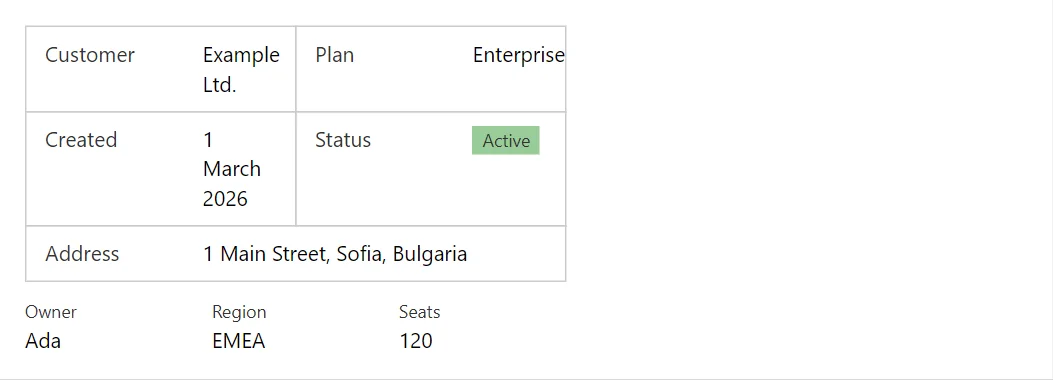
Example
<Descriptions Columns="2" Bordered="true">
    <DescriptionItem Label="Customer">Example Ltd.</DescriptionItem>
    <DescriptionItem Label="Plan">Enterprise</DescriptionItem>
    <DescriptionItem Label="Created">1 March 2026</DescriptionItem>
    <DescriptionItem Label="Status"><Badge Severity="Severity.Success">Active</Badge></DescriptionItem>
    <DescriptionItem Label="Address" Wide="true">1 Main Street, Sofia, Bulgaria</DescriptionItem>
</Descriptions>
<Descriptions Columns="3" Vertical="true">
    <DescriptionItem Label="Owner">Ada</DescriptionItem>
    <DescriptionItem Label="Region">EMEA</DescriptionItem>
    <DescriptionItem Label="Seats">120</DescriptionItem>
</Descriptions>
A short fragment. Add @using RayCraft.Blazor.Components to your page and use an interactive render mode.
Included in RayCraft Free. Working examples are in the GitHub repository (MIT); it holds example and demo code, not the library code.