



A month view with events people can read at a glance. Multi-day events appear on each day they cover, and a busy day shows a +n more link.
Why it helps
- Events on a month grid
- Multi-day events
- Overflow handled
Where it fits
- Team calendars
- Holidays
- Event listings
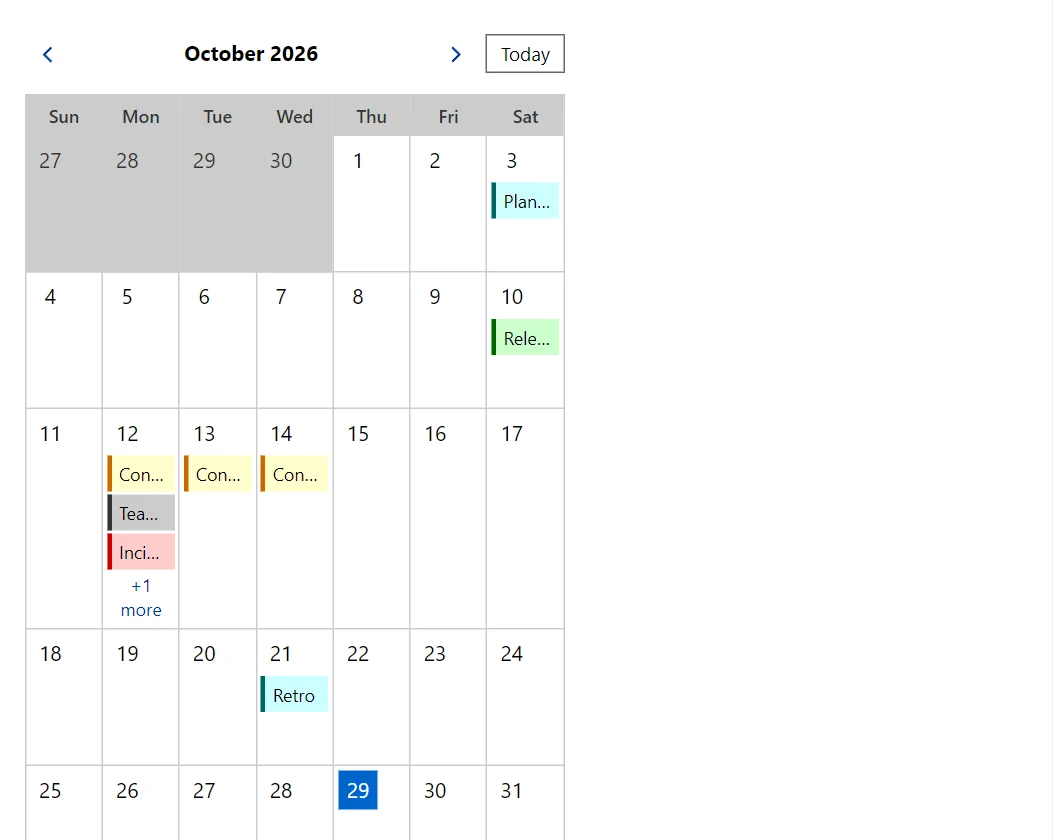
Example
<EventCalendar Events="_events" @bind-Month="_month" OnEventClick="@(e => _last = e.Title)" OnDayClick="DayClicked" />
<span>Last click: @_last</span>

@code {
    private DateTime _month = new(DateTime.Today.Year, DateTime.Today.Month, 1);
    private string _last = "none";

    private readonly List<CalendarEvent> _events = Build();

    private void DayClicked(DateTime day) => _last = day.ToString("D");

    private static List<CalendarEvent> Build()
    {
        var first = new DateTime(DateTime.Today.Year, DateTime.Today.Month, 1);
        return
        [
            new("Planning", first.AddDays(2).AddHours(9)),
            new("Release", first.AddDays(9), null, Severity.Success),
            new("Conference", first.AddDays(11), first.AddDays(13), Severity.Warning),
            new("Incident review", first.AddDays(11).AddHours(14), null, Severity.Error),
            new("Team lunch", first.AddDays(11).AddHours(12), null, Severity.Neutral),
            new("Demo", first.AddDays(11).AddHours(16)),
            new("Retro", first.AddDays(20))
        ];
    }
}
A short fragment. Add @using RayCraft.Blazor.Components to your page and use an interactive render mode.
Included in RayCraft Free. Working examples are in the GitHub repository (MIT); it holds example and demo code, not the library code.