



Build a form from a list of field definitions instead of writing markup: text, email, password, number, date, select, radio, check box and switch.
Why it helps
- Forms from definitions
- Common field types
- Validation included
Where it fits
- Admin screens
- Dynamic forms
- Prototypes
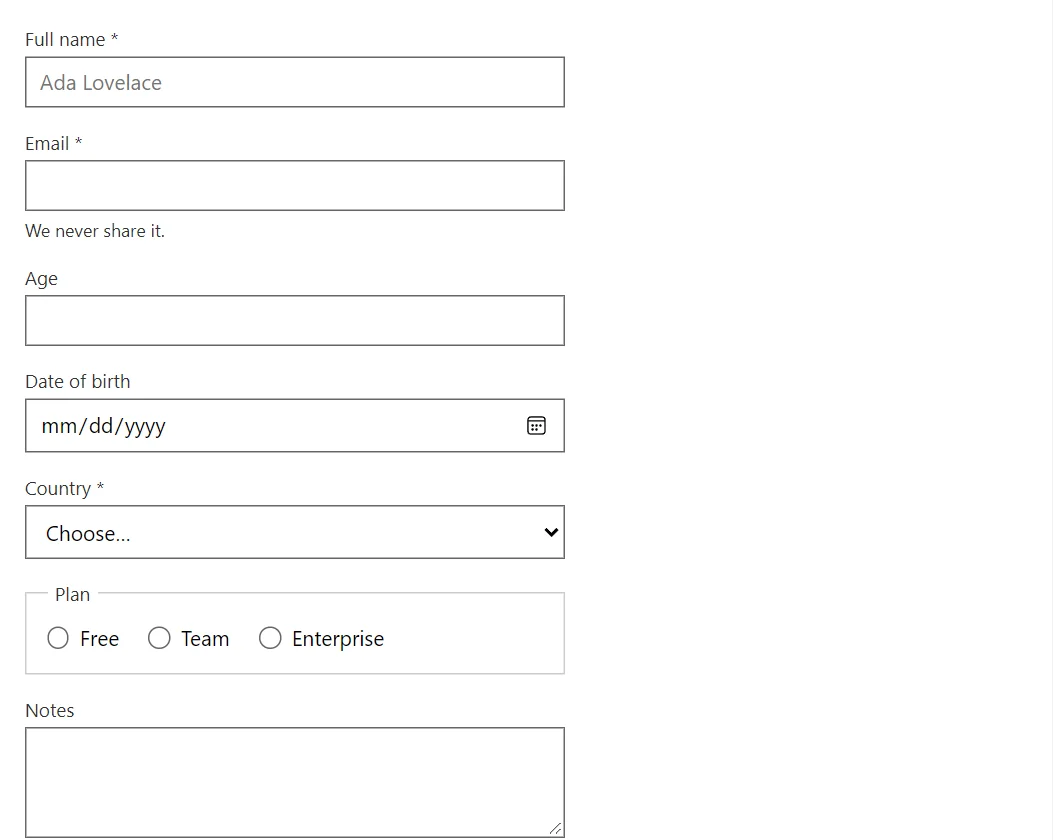
Example
<FormBuilder Fields="_fields" Values="_values" OnSubmit="Submitted" SubmitText="Register" />
<pre class="code-block" tabindex="0"><code>@_result</code></pre>

@code {
    private string _result = "Submit the form to see the values.";
    private readonly Dictionary<string, object?> _values = new() { ["newsletter"] = true };

    private readonly FormField[] _fields =
    [
        new("name", "Full name", Required: true, Placeholder: "Ada Lovelace"),
        new("email", "Email", FormFieldKind.Email, Required: true, Help: "We never share it."),
        new("age", "Age", FormFieldKind.Number, Min: 18, Max: 120),
        new("birth", "Date of birth", FormFieldKind.Date),
        new("country", "Country", FormFieldKind.Select, Options: ["Bulgaria", "Germany", "Norway"], Placeholder: "Choose…", Required: true),
        new("plan", "Plan", FormFieldKind.Radio, Options: ["Free", "Team", "Enterprise"]),
        new("notes", "Notes", FormFieldKind.TextArea, Lines: 3),
        new("newsletter", "Send me the newsletter", FormFieldKind.Switch),
        new("terms", "I accept the terms", FormFieldKind.Checkbox, Required: true)
    ];

    private void Submitted(IReadOnlyDictionary<string, object?> values) =>
        _result = string.Join("\n", values.Select(pair => $"{pair.Key} = {pair.Value}"));
}
A short fragment. Add @using RayCraft.Blazor.Components to your page and use an interactive render mode.
Included in RayCraft Free. Working examples are in the GitHub repository (MIT); it holds example and demo code, not the library code.