



Arrange labels and fields in a responsive twelve-column grid with titled sections, so forms look orderly on every screen.
Why it helps
- Responsive grid
- Titled sections
- Labels linked to fields
Where it fits
- Settings and profile pages
- Admin forms
- Dialogs
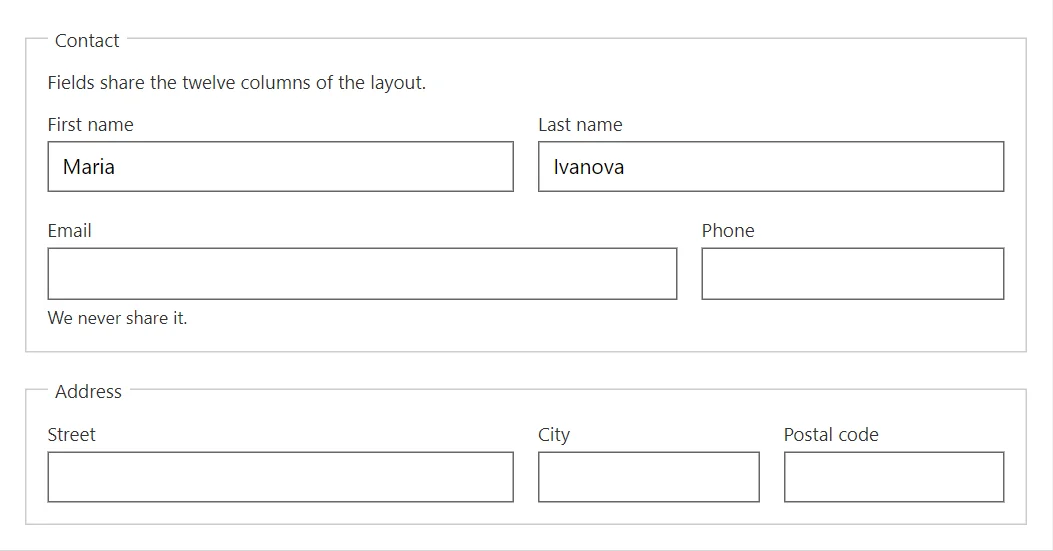
Example
<FormLayout LabelPosition="FormLabelPosition.Start" Spacing="3">
    <FormLayoutItem Label="Name" HelperText="As on your ID.">
        <TextField @bind-Value="_name" />
    </FormLayoutItem>
    <FormLayoutItem Label="Email">
        <TextField @bind-Value="_email" Type="email" />
    </FormLayoutItem>
    <FormLayoutItem Label="Notes">
        <TextField @bind-Value="_notes" Lines="3" />
    </FormLayoutItem>
    <FormLayoutItem Label="Subscribe">
        <Switch @bind-Value="_subscribe" Label="Send me the newsletter" />
    </FormLayoutItem>
</FormLayout>

@code {
    private string? _name;
    private string? _email;
    private string? _notes;
    private bool _subscribe = true;
}
A short fragment. Add @using RayCraft.Blazor.Components to your page and use an interactive render mode.
Included in RayCraft Free. Working examples are in the GitHub repository (MIT); it holds example and demo code, not the library code.