



Vertical lists with an icon, two lines of text and a trailing action on each row, with items that become links or buttons.
Why it helps
- Icons and two lines
- Links or buttons
- Actions
Where it fits
- Menus
- Mailboxes
- Settings
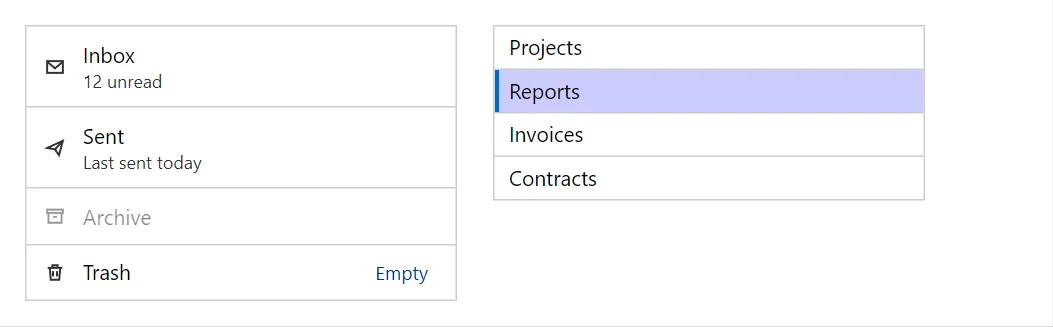
Example
<Stack Align="flex-start" Spacing="6" Wrap="true">
    <List Bordered="true" Style="width:100%;max-width:18rem">
        <ListItem Icon="IconName.Mail" Text="Inbox" SecondaryText="12 unread" />
        <ListItem Icon="IconName.Send" Text="Sent" SecondaryText="Last sent today" />
        <ListItem Icon="IconName.Archive" Text="Archive" Disabled="true" OnClick="@(() => { })" />
        <ListItem Icon="IconName.Delete" Text="Trash">
            <Action><Button Variant="Variant.Text" Size="Size.Small">Empty</Button></Action>
        </ListItem>
    </List>
    <List Bordered="true" Dense="true" Style="width:100%;max-width:18rem">
        @foreach (var folder in _folders)
        {
            <ListItem Text="@folder" Selected="_selected == folder" OnClick="@(() => _selected = folder)" />
        }
    </List>
</Stack>

@code {
    private readonly string[] _folders = ["Projects", "Reports", "Invoices", "Contracts"];
    private string _selected = "Reports";
}
A short fragment. Add @using RayCraft.Blazor.Components to your page and use an interactive render mode.
Included in RayCraft Free. Working examples are in the GitHub repository (MIT); it holds example and demo code, not the library code.