



For people who write Markdown rather than rich text: a text area with a formatting toolbar and a live preview side by side.
Why it helps
- Toolbar for common formatting
- Live preview
- Plain Markdown as the value
Where it fits
- Documentation and notes
- Issue descriptions
- Blog posts
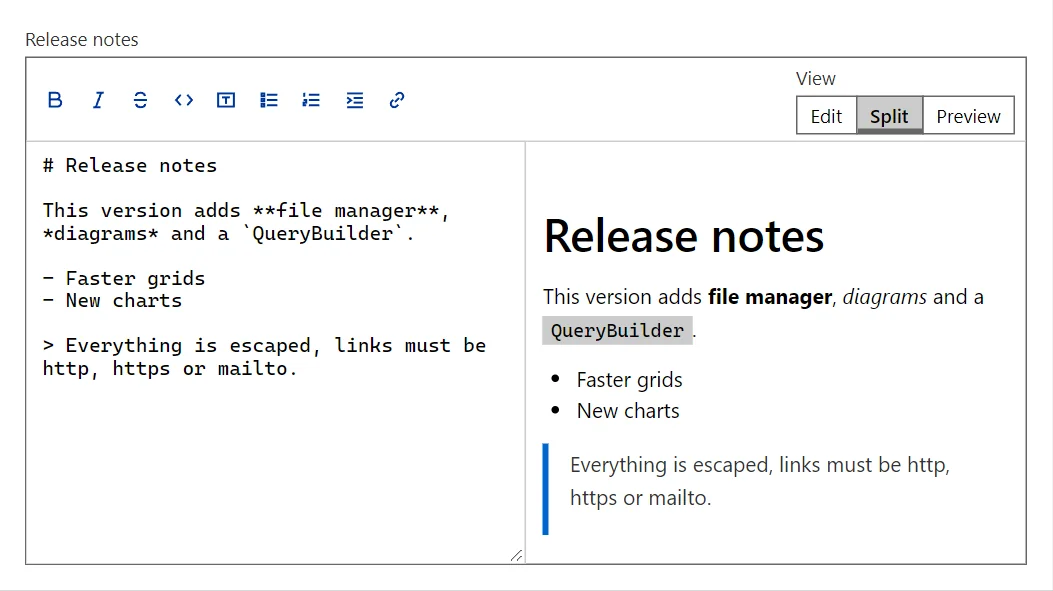
Example
<MarkdownEditor Label="Release notes" @bind-Value="_text" Rows="10" />

@code {
    private string? _text = "# Release notes\n\nThis version adds **file manager**, *diagrams* and a `QueryBuilder`.\n\n- Faster grids\n- New charts\n\n> Everything is escaped, links must be http, https or mailto.";
}
A short fragment. Add @using RayCraft.Blazor.Components to your page and use an interactive render mode.
Included in RayCraft Free. Working examples are in the GitHub repository (MIT); it holds example and demo code, not the library code.