



Plan cards with a price, a feature list and a button, plus an optional switch between monthly and yearly.
Why it helps
- Plan cards
- Monthly or yearly switch
- Feature lists
Where it fits
- Websites
- Upgrades
- Subscriptions
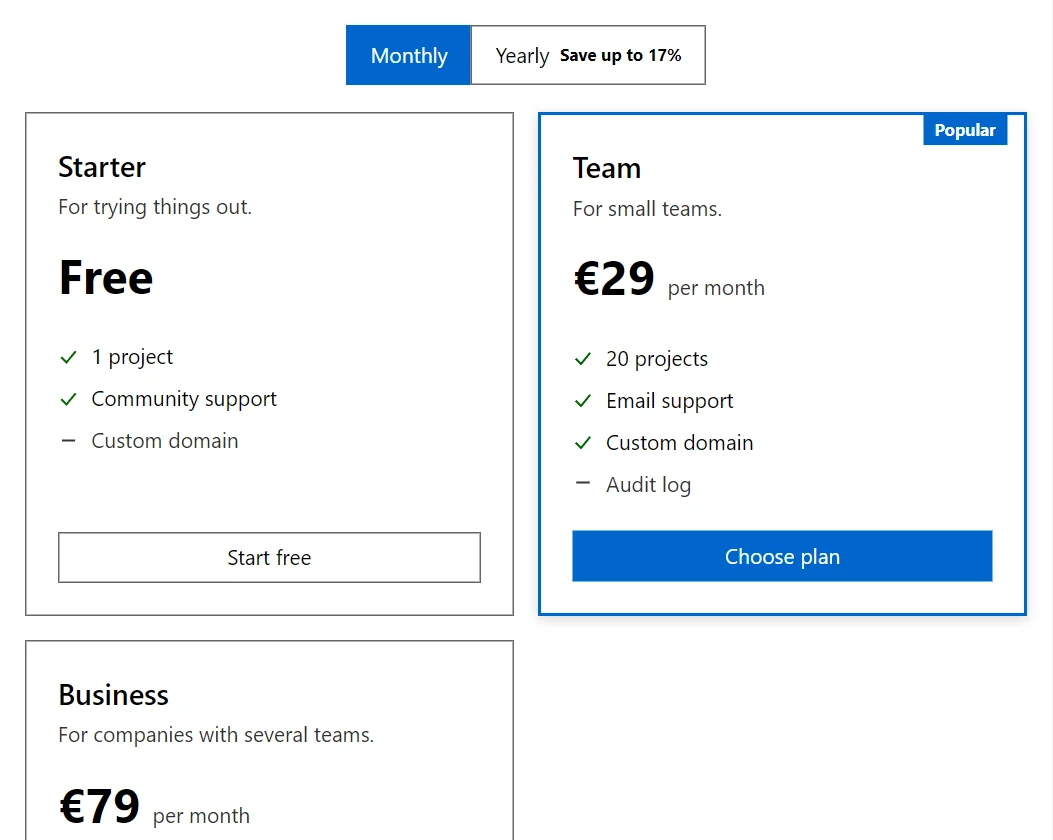
Example
<PricingTable Label="Plans" Plans="_plans" CurrencySymbol="€" @bind-Yearly="_yearly" OnSelect="Chosen" />
<p>@_message</p>

@code {
    private bool _yearly;
    private string _message = "Choose a plan.";

    private readonly PricingPlan[] _plans =
    [
        new("Starter", 0, 0, [new("1 project"), new("Community support"), new("Custom domain", false)], "For trying things out.", PriceText: "Free", ButtonText: "Start free"),
        new("Team", 29, 290, [new("20 projects"), new("Email support"), new("Custom domain"), new("Audit log", false)], "For small teams.", Featured: true, Badge: "Popular"),
        new("Business", 79, 790, [new("Unlimited projects"), new("Priority support"), new("Custom domain"), new("Audit log")], "For companies with several teams.")
    ];

    private void Chosen(PricingPlan plan) => _message = $"Chosen: {plan.Name} ({(_yearly ? "yearly" : "monthly")})";
}
A short fragment. Add @using RayCraft.Blazor.Components to your page and use an interactive render mode.
Included in RayCraft Free. Working examples are in the GitHub repository (MIT); it holds example and demo code, not the library code.