



Koppen, lopende tekst, bijschriften en overlines met het lettertype en de groottes van het thema. Koppen renderen echte koptags, zodat je pagina een goede structuur houdt.
Waarom het helpt
- Consistente lettergroottes
- Echte koppen
- Lettertype van het thema
Waar het past
- Pagina's
- Artikelen
- Kaarten
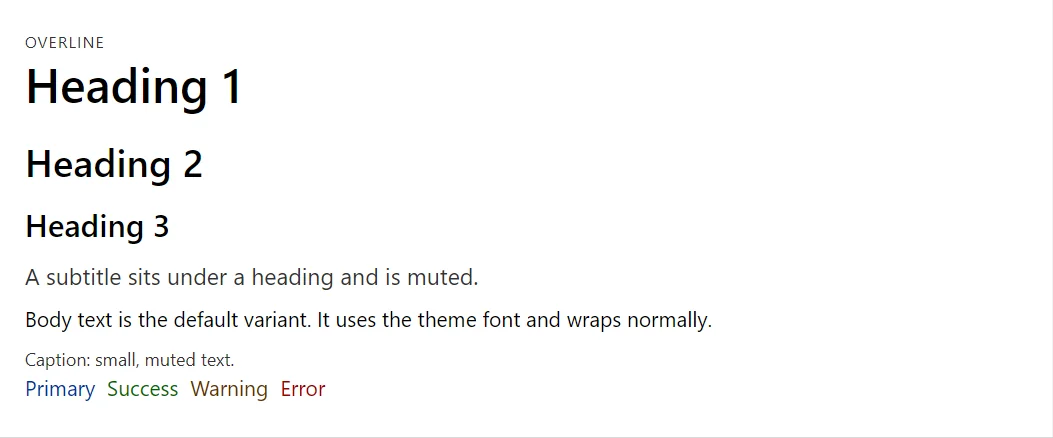
Voorbeeld
<Typography Variant="TypographyVariant.Overline">Overline</Typography>
<Typography Variant="TypographyVariant.H1">Heading 1</Typography>
<Typography Variant="TypographyVariant.H2">Heading 2</Typography>
<Typography Variant="TypographyVariant.H3">Heading 3</Typography>
<Typography Variant="TypographyVariant.Subtitle">A subtitle sits under a heading and is muted.</Typography>
<Typography>Body text is the default variant. It uses the theme font and wraps normally.</Typography>
<Typography Variant="TypographyVariant.Caption">Caption: small, muted text.</Typography>
<Stack>
    <Typography Color="TypographyColor.Primary">Primary</Typography>
    <Typography Color="TypographyColor.Success">Success</Typography>
    <Typography Color="TypographyColor.Warning">Warning</Typography>
    <Typography Color="TypographyColor.Error">Error</Typography>
</Stack>
Een kort fragment. Voeg @using RayCraft.Blazor.Components toe aan je pagina en gebruik een interactieve rendermodus.
Inbegrepen in RayCraft Free. Werkende voorbeelden staan in de GitHub-repository (MIT); het bevat voorbeeld- en democode, niet de code van de bibliotheek.